You help make Hymnary.org possible. More than 10 million people from 200+ countries found hymns, liturgical resources and encouragement on Hymnary.org in 2025, including you. Every visit affirms the global impact of this ministry.
If Hymnary has been meaningful to you this year, would you take a moment today to help sustain it? A gift of any size—paired with a note of encouragement if you wish—directly supports the server costs, research work and curation that keep this resource freely available to the world.
Give securely online today, or mail a check to:
Hymnary.org
Calvin University
3201 Burton Street SE
Grand Rapids, MI 49546
Thank you for your partnership, and may the hope of Advent fill your heart.


 My Starred Hymns
 My FlexScores
 My Hymnals
 My Purchased Files




Comments
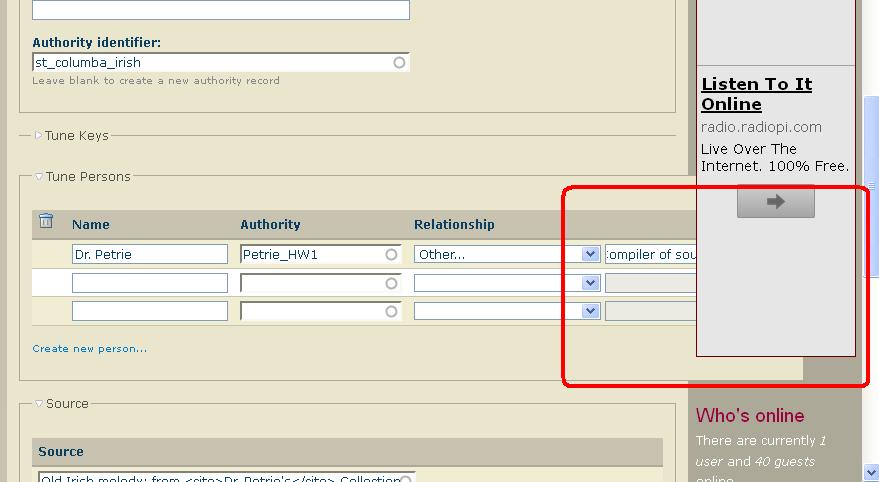
Ads obscuring edit window
Can you make your browser window wider?
wider browser window?
Not in physical dimensions; it fills the screen. But I could increase the pixels per cm, though I think that would result in painfully tiny fonts and/or having to scroll sideways a lot. No other website that I visit has this problem, so I think it's a hymnary.org issue. I certainly don't want to have to change screen resolution every time I enter or leave this site. It won't keep me from participating in building the database, but it will slow me down and irritate me. And it's something that just started happening yesterday. If it's happening to me, it's probably happening to other users/editors, too.
Okay, I found a workable setting
which may require me to get new glasses sooner than the old one, but at least for today it works, and it makes the date field move far enough left to be usable, though it's still weird-looking and just wrong as you can see here.
I've asked someone on this
I've asked someone on this end to fix the problem, but in the meantime, maybe you can use the altered settings...
Harry
Yeah, I'm using the new setting
but would be happy to be able to go back to slightly larger print.
If you are a webmaster, you
If you are a webmaster, you could use some user generated ad sizes. Hope it will fix the issue.